What you promised.
Your commitments come first, with due dates and the conversation behind them. Add a task to Apple Reminders.
 SecondBrain
Private AI memory for founders and executives with back-to-back calls. Your notes, commitments and context, kept on your Mac.
One meeting. Three useful questions.
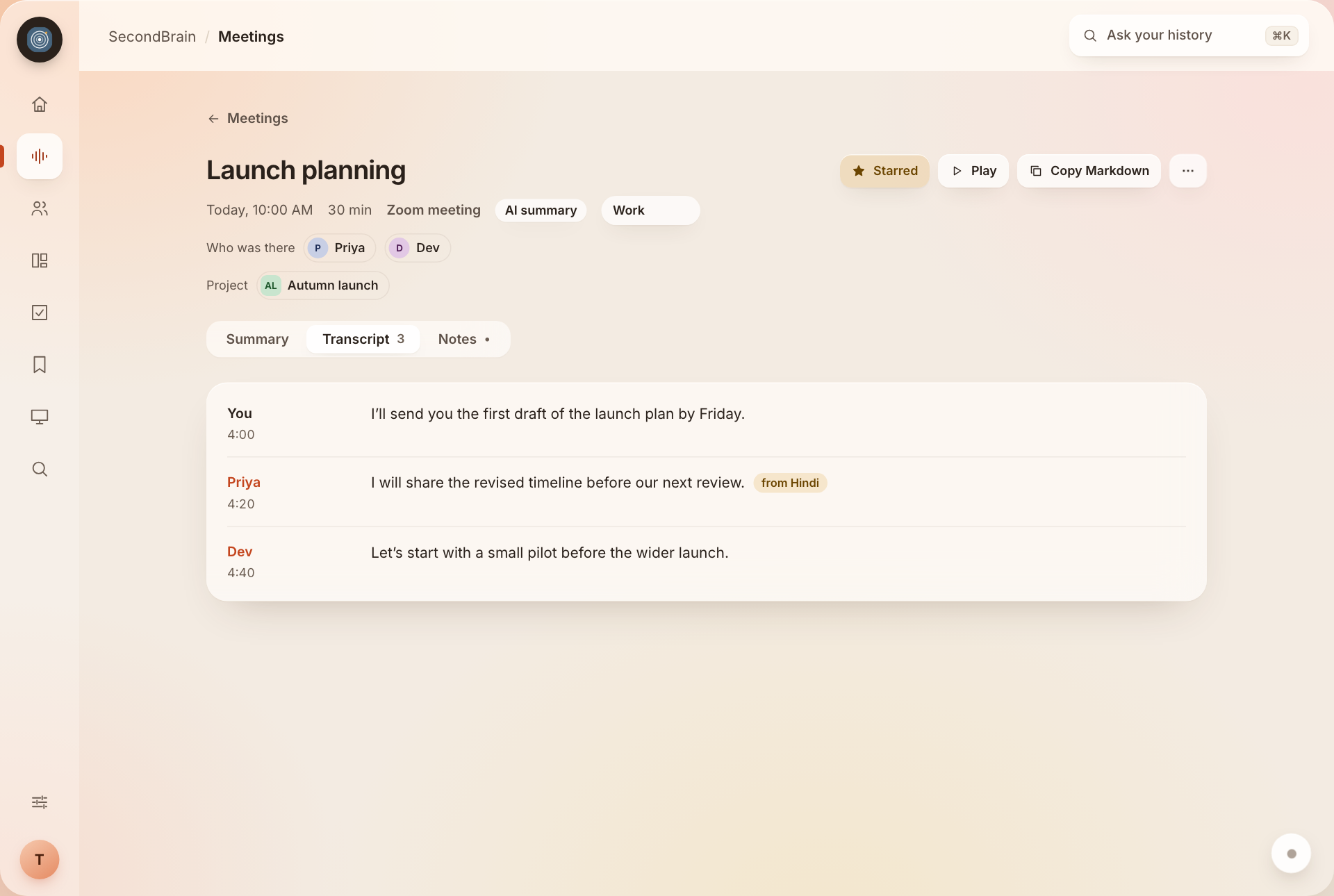
Interactive example · Fictional dataLaunch planning
You, Priya & Dev · 30 min
A conversation you already had.
Context you can use again.
What do I owe Priya?
Send Priya the first draft of the launch plan by Friday.
“I’ll send you the first draft of the launch plan by Friday.”You · Launch planning · 4:00
A fixed example of cited recall, not a live AI chat. Your actual answers draw on your recorded history.
You can move from one call to the next without carrying every detail with you.
SecondBrain listens through your Mac’s microphone and computer audio. Meetings only is the default: it starts with the call and stops when it ends.
A summary, decisions, tasks and risks. Notes are usually ready a few minutes after the call. The promises are separated from the “maybe” talk.
See where things stand with a person or project. Opt into Apple Calendar for past notes, open tasks and a reminder before the next meeting.
Zoom · Microsoft Teams · Google Meet · Slack huddles · FaceTime · Webex · WhatsApp · Discord
A note is useful. Knowing who owes what—and where it came from—is what helps you follow through.
“I’ll send you the first draft of the launch plan by Friday.”
You · Launch planning
The person, the project and the next step stay connected to the meeting.
Illustrative example · Fictional people and project
Your commitments come first, with due dates and the conversation behind them. Add a task to Apple Reminders.
Keep someone else’s promise in view. Follow up with their name, the task and the original context.
Come back to decisions by day. See the source and the people involved, without rereading every note.
Your working day is connected. Your memory of it should be too.
People brings together your conversations, what you owe each other and where things stand. Rename or merge a person when needed; corrections stick.
Projects connects recurring work across meetings and notes. See the status, next step, people, tasks and decisions in one place.
Explore the interface. Every preview uses fictional data; the final application may vary.
Your commitments, what others owe you, decisions and today’s meetings. One place to see what needs your attention.
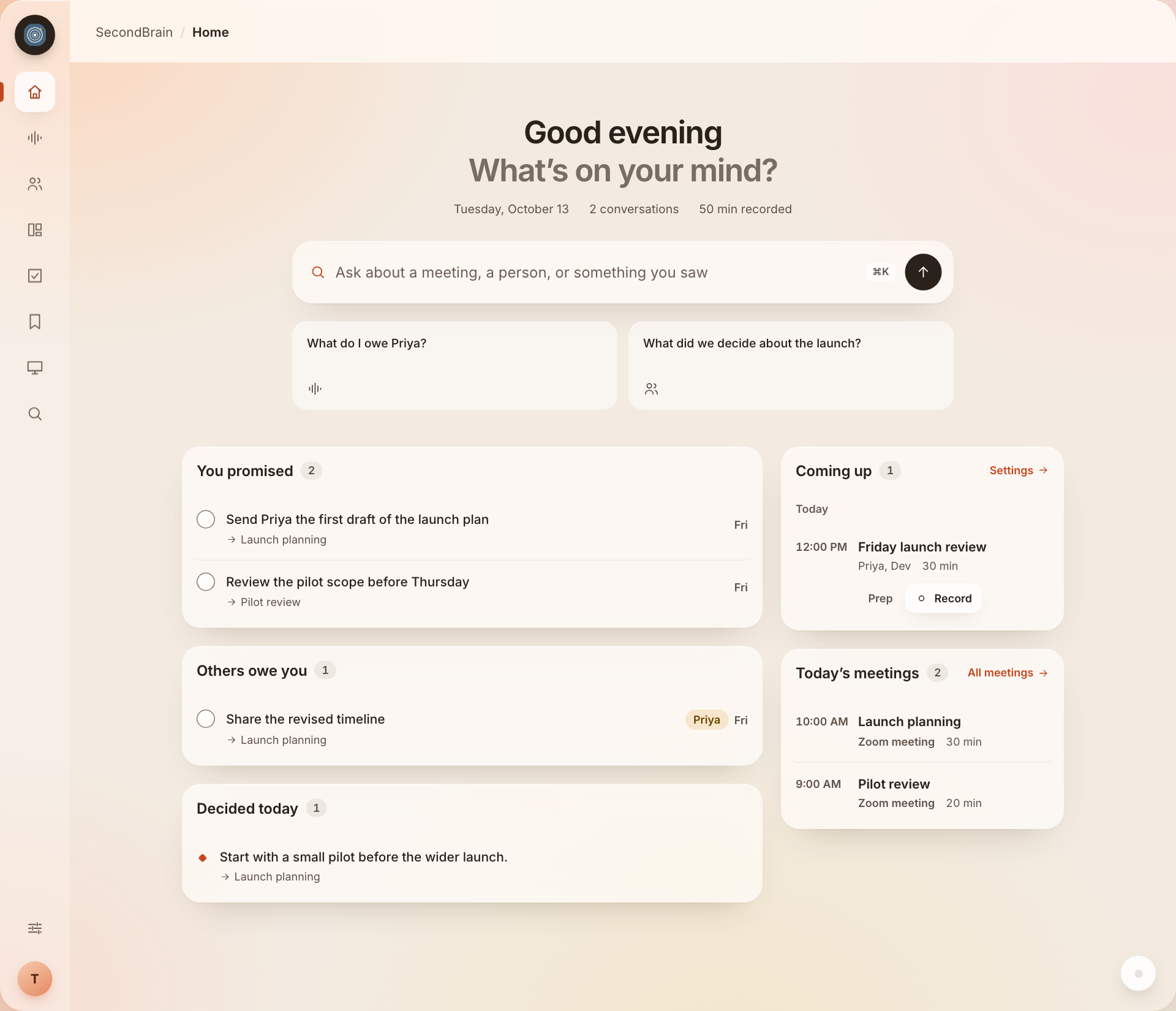 Enlarge preview
 ⌘ ⇧ Space opens Ask from any app.
Accessibility permission is required.
Ask a follow-up. Return to past questions. Open the sources behind an answer.
Your recordings, transcripts, notes and screen text stay on your Mac. The built-in AI runs there too.
Recordings → transcripts → notes → cited answers
Stored and processed on this deviceChoose Meetings only, Always or Off. Pause at any time. The recording state stays visible.
Screen memory is off by default. If you enable it, choose apps and websites it must never capture.
Export your history, delete a meeting or memory, or erase everything. Audio is deleted after 7 days by default.
Internet is needed for setup and model downloads. After that, built-in AI works offline without an account. Optional weather uses approximate location; upcoming email connections use an online service. Encryption at rest relies on macOS FileVault. Read the privacy details.
Useful details, without the fine-print hunt.
Type during a call and your notes are folded into the summary. Set standing summary instructions. Play the audio, read the transcript, or choose “Listen again” for a slower accuracy pass.
Copy Markdown, save to a folder, or automatically save meeting notes to an Obsidian vault. Tasks can go to Apple Reminders. Email connections and sending tasks to other apps are coming soon.
Speech in another language is detected and translated into English on your Mac. A one-time 3 GB translator download is required. Quality varies by language; Tamil, Malayalam and mixed-language task extraction are still being tested.
Explore a translated transcriptScreen memory is a separate opt-in setting. When enabled, it captures every 30 seconds by default, uses Apple text recognition and skips unchanged screens. The interval is adjustable. Images are deleted after 7 days by default; recognized text stays searchable.
On a plugged-in M2 MacBook Air with 16 GB memory, transcripts follow speech by about 20 seconds. Notes for a 30-minute call take a few minutes afterward. Low Power Mode can be about four times slower.
Whisper large-v3-turbo handles speech. Whisper large-v3 translates into English. Qwen3.5 9B runs notes, People, Projects and Ask on 16 GB Macs; Llama 3.2 3B runs on 8 GB Macs. Both use Apple’s MLX. BGE embeddings handle search and Apple Vision reads screen text.
SecondBrain for Mac is coming soon. Talk to Akshay about the release or explore a pilot for your team.
Talk to AkshayPricing and availability will be announced with the public release.
No. SecondBrain listens on your Mac, using your microphone and computer audio. No bot joins the call. Recording other people may require their consent where you live.
Meetings only is the default: recording starts with a call and stops when it ends. Choose Always, or Off to record only when you press “Record now.” Pause or stop at any time. The menu bar and sidebar show the recording state.
Recordings, transcripts, notes and screen text stay on your Mac. Internet is used for setup and model downloads. Two optional connections are off by default: live weather sends a city name once, then a location rounded to about 10 km to open-meteo.com; it never sends recording, note or screen content. Email for People is coming soon: it will read recent Gmail or Outlook mail through Composio, read-only, and keep and summarize the text on your Mac. Encryption at rest relies on macOS FileVault.
No. It is a separate opt-in setting. When enabled, the default interval is 30 seconds. Choose which apps and sites it never captures, and how long images are kept. Screenshots are deleted after 7 days by default while recognized text remains searchable.
SecondBrain detects the language and writes the transcript in English using an on-device translator. The translator needs a one-time 3 GB download. Translation quality varies; Tamil, Malayalam and mixed-language task extraction are still being tested.
Copy a meeting note as Markdown, save it to a folder, or automatically save every note to a folder such as an Obsidian vault. Tasks can be added to Apple Reminders. Sending tasks to other apps is not available to customers yet.
Yes, when you opt into Apple Calendar access. Before a calendar meeting, it brings together past notes with the same people, open tasks and decisions, and notifies you 10 minutes before. Calendar access is off by default.
Pricing and availability are being finalized. Details will be announced with the public release. Checkout and a current public download are not available yet.
These are illustrative previews of SecondBrain’s updated interface, using fictional people, meetings and project data. They show the new design direction and do not contain customer information. The final application may vary. Email connections and sending tasks to other apps are coming soon.